
fbpx

What's new in CMS IntelliCAD 14.0

What's new in CMS IntelliCAD 14.0


CMS IntelliCAD 14 User Interface

The New CMS IntelliCAD® 14 CAD Software offering the performance enhancements, development flexibility, and integration capabilities that add-on CAD solution providers and development teams depend on. Free trial or demo available at the download section of this website.

What’s New in CMS IntelliCAD 14.0?

With improvements across performance, interoperability, and developer tools, CMS IntelliCAD 14.0 helps you boost your productivity while maintaining file compatibility.

  • Dark Theme Interface: Deliver a polished user experience with CMS IntelliCAD’s new Dark Theme. Key UI elements have been refreshed—including over 150 icons—for a clean, professional look in Dark, Light, and Gray modes.

  • QR Code Support: Use the new QRTEXT and QRLEADER commands to embed QR codes directly into drawings, which is ideal for linking drawings to metadata, contacts, assets, or websites.

  • Enhanced Table and MTEXT Editing: Excel-style auto-fill in tables, new stacking options in MTEXT, and improved editing tools streamline data entry and annotation tasks.

  • Smarter Data Extraction: Filter output to include only relevant entities and now extract data from Civil 3D objects, helping you build richer reports and integrations.

  • BIM and Format Updates: Now with support for Revit 2025 formats, improved DGN import, and new SVG import capabilities. You can also flip BIM walls and adjust architectural spaces with new grips.

  • UI Features for Power Users: Detached drawing windows and command-line transparency options enable advanced workflows across multiple monitors.

  • API and Developer Tools: New LISP property functions: dumpallproperties, getpropertyvalue, setpropertyvalue, and ispropertyreadonly. The new VLISP command launches CMS IntelliCAD’s Lisp Debugger inside Visual Studio Code. The .NET API has improved performance when working with view objects and bulk editing via grips.

  • Mapping Updates: Esri imagery is now supported in the GEO command, augmenting Bing Maps and enhancing location-based workflows.

  • Additional Enhancements: Use Tables as TRIM boundaries, expanded OVERKILL support for cleaning up geometry, and improved publishing, snapping, scaling, and annotation tools. There is also new language support for German, Italian, Korean, and Polish.

  • Performance Boosts: Key commands like Copy to Clipboard (30x faster), Break (12x), Move, Union, and View have all received speed improvements. Your users will notice the difference.

Free trial available at https://intellicadms.com

CMS IntelliCAD 14 licenses are available as Perpetual or Lease Standalone seats, USB dongle seats, Network floating seats or Renewable Subscriptions.
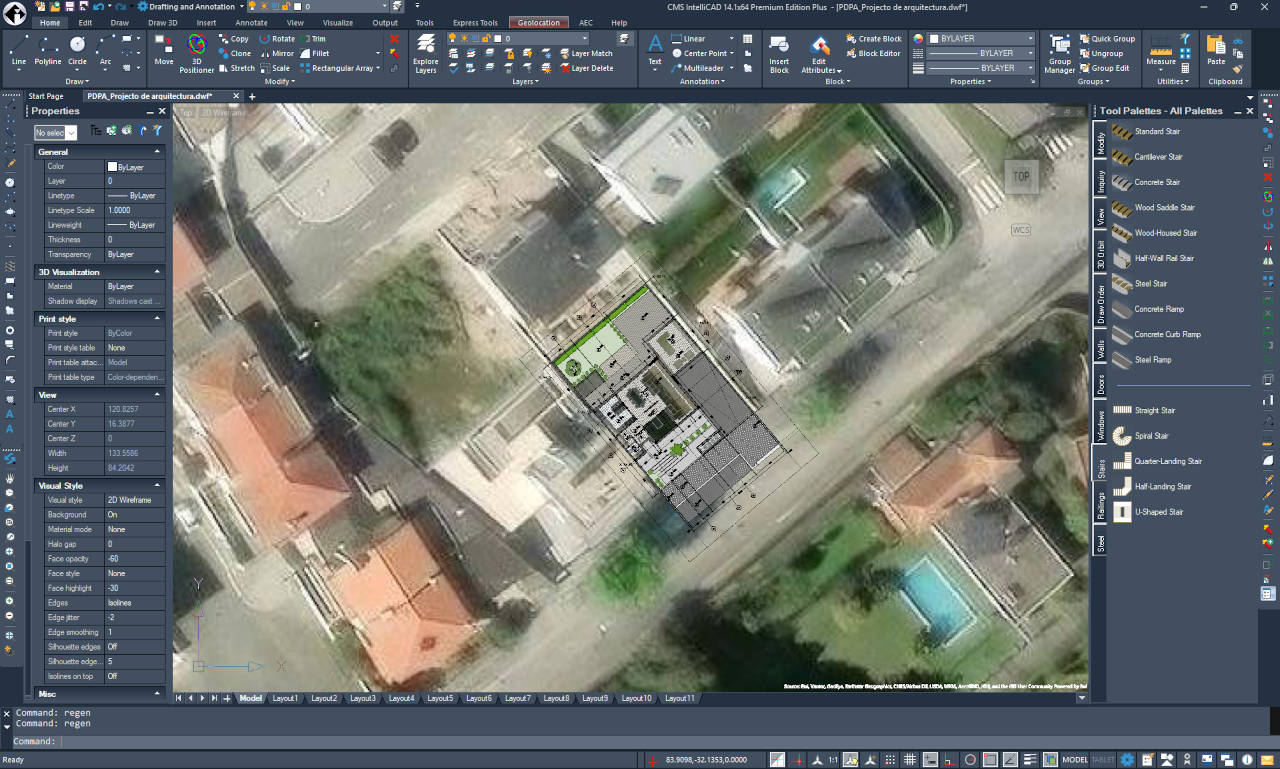
What's new in CMS IntelliCAD 14.1

What's new in CMS IntelliCAD 14.1


CMS IntelliCAD 14.1 User Interface

CMS IntelliCAD 14.1 introduces significant performance gains, expanded geospatial capabilities, and refined BIM workflows to streamline professional drafting.


1. Mapping & Geospatial Integration

  • Geospatial PDFs: Export drawings to PDF with live coordinate and measurement metadata, allowing reviewers to see real-time location data.
  • Azure Maps: In addition to Bing, users can now utilize Microsoft Azure Maps with the new GEOMICROSOFTSERVICE command.

2. Performance & Security Enhancements

  • Speed Boosts: Enjoy up to 63% faster line creation when snapping and 2x faster Copy commands (with VBA enabled). Performance for Undo and GEO map rendering has also been optimized.
  • Secure Signing: Digital signatures now leverage Cryptography Next Generation (CNG) technology, supporting self-signed certificates for easier security workflows.
  • Advanced Undo: The new MREDO (Multiple Redo) command allows users to roll back multiple changes and system variable updates simultaneously.

3. Drafting & Block Management

  • Block Testing: The BTESTBLOCK command allows users to test advanced blocks in a temporary window without altering the original definition.
  • Enhanced Tool Palettes: Now supports images, leaders, and external references with high-visibility previews.
  • Table & Layer Automation: Tables now support auto-filling with blocks and improved keyboard navigation. Layer filters can be exported to .lft files or copied directly to Excel for auditing.

4. BIM Workflows

  • BIM Openings: New anchor options provide precise control over how doors and windows orient and scale relative to walls.

5. UI & API Improvements

  • Dynamic UI: Icons now automatically adapt to Dark, Gray, or Light themes. Selection cycling is now accessible directly from the status bar.
  • LISP & .NET: Support for compiled FAS and VLX LISP formats for protected distribution, alongside new debugging tools in Visual Studio Code and expanded IcARX functions.

Note: This update also includes extensive "under the hood" fixes for external references, snapping, data extraction, and polyline editing to ensure maximum stability.

Free trial available at https://intellicadms.com

CMS IntelliCAD 14.1 licenses are available as Perpetual or Lease Standalone seats, USB dongle seats, Network floating seats or Renewable Subscriptions.

What's new in CMS IntelliCAD 13.1

What's new in CMS IntelliCAD 13.1


CMS IntelliCAD 13.1 User Interface

The New CMS IntelliCAD® 13.1 CAD Software new features, performance improvements and additional refinements. Free trial or demo available at the download section of this website.

What's new:

CMS IntelliCAD 13.1 is a major release that includes performance improvements and new features, with a focus on enhanced reporting capabilities using the Extract Data command. Extracting data is completely refactored for improved performance and additional reporting on drawing properties (such as file size, path, etc.), drawing system variables, and the number of entities in drawings. Users can customize reports before they’re created with more options and now easily update linked report tables in drawings.

Other new features include customizing user interface elements for running and one-time entity snaps, printing to PNG files with transparent backgrounds, using an additional interactive dialog to precisely move and rotate entities with the 3D Positioner command, selecting from new options for the Trim and Extend commands, cloning additional entity types with the Clone command, and restoring hidden program messages individually.

Additionally, LISP and IcARX APIs include enhanced compatibility and improved performance

All CMS IntelliCAD versions support BIM files, and with this new release users create architectural spaces using the Spaces command, and infill AEC entities when using the Section Plane command.

For technical users, CMS IntelliCAD 13.1 uses ODA SDKs version 2024.12. CMS IntelliCAD IcARX continues to be a pre-release version for members and is highly compatible with AutoCAD® ObjectARX, allowing developers to build applications with a single code base that runs on both platforms..

CMS IntelliCAD 13.1 licenses are available as Perpetual or Lease  Standalone seats, USB dongle seats, Network floating seats or Renewable Subscriptions.

What's new in CMS IntelliCAD 13.0

What's new in CMS IntelliCAD 13.0


CMS IntelliCAD 13.0 User Interface

The New CMS IntelliCAD® 13.0 CAD Software another step forward on new features and improvements. Free trial or demo available at the download section of this website.

What's new:

CMS IntelliCAD 13.0 is a major release that includes performance improvements and new features, including a new Options dialog which is highly compatible with other CAD applications, calculators for evaluating expressions and converting units of measurement, lookup tables and the ability to reset advanced blocks. When creating reports, extract data from external references, advanced blocks, attributes, and AEC entities; extract from .dgn, .ifc, .rvt, and .rfa files when supported; and filter data to meet conditions.

LISP is completely refactored to improve performance and increase compatibility with other CAD applications. Other new features include Flatshot, Solid Profile, Make Shape, Compile to SHX, and Make Linetype, and more.

For CMS IntelliCAD 13.0 PE PLUS licenses that include Spatial® Technology ACIS® modeler, use the following commands to work with surfaces: Network, Offset, Fillet, Extend, and Trim.

All CMS IntelliCAD support working with BIM files: use the IFC Validate, RVT to IFC conversion, and Corner Window commands; dimension AEC entities; manage layers for .ifc underlays; define styles for new elements such as roof slabs, dimensions, structural members, and more; and attach railings to stair segments.

For technical users, CMS IntelliCAD 13.0 uses ODA SDKs version 2024.12. IntelliCAD IcARX continues to be a pre-release version and is highly compatible with AutoCAD® Object ARX, allowing developers to build applications with a single code base that runs on both platforms.

CMS IntelliCAD 12.x licenses are available as Perpetual or Lease  Standalone seats, USB dongle seats, Network floating seats or Renewable Subscriptions.

What's new in CMS IntelliCAD 12.x

What's new in CMS IntelliCAD 12.x


CMS IntelliCAD 12.x User Interface

The New CMS IntelliCAD® 12.x CAD Software version is another major leap forward on features and improvements. Free trial or demo available at the download section of this website.

What's new:

CMS IntelliCAD 12.x is a major release that includes performance improvements and new features. Create reports and report templates, extracting data to tables and .xls files. Create super hatches using images, textures, blocks, external references, and wipeouts. Dynamically display and customize the Quick Properties pane to modify often-used properties. Draw splines using control vertices and knot parameterization. Use the new Geometric Center snap. Create and edit legacy image tile menus. For tables, export them to .csv files, create and update them from extracted drawing data, remove cell formatting overrides, and specify cell border properties.

For users who use the Explorer, manage more visual style properties, manage more layout settings, and specify whether to freeze layers automatically in layouts that you create. For all Explorer elements, change the column order, visibility of columns, and restore the default display of columns.

Additional new commands include Project Geometry, Show CV and Hide CV, Layer Isolate VP Freeze, Global Edit Attributes, Rename Block, Change Block, Set Z All, Quick Trim, and Copy Multiple.

More enhancements include importing page setups from other drawings, choosing PDF presets when publishing or exporting to .pdf files, importing and exporting Facet Modeler Binary (.fmb) files, setting display settings for section planes, controlling whether entities on layers can be cut by section planes, and previewing modifications when using the Offset, Trim, and Extend commands and when editing hatches.

For CMS IntelliCAD versions that support working with BIM files: customize AEC styles, attach roof and ceiling plane symbols to walls and reference them while interactively creating roof and ceiling planes, assign levels to AEC entities, import .ifc files with more options, and include .rvt and .ifc underlays when exporting to .ifc files.

For technical users, CMS IntelliCAD 12.x incorporates an updated .NET API and uses ODA SDKs version 2023.12. IntelliCAD IcAPI is a pre-release version for members and is highly compatible with AutoCAD® Object ARX, allowing ITC members to build applications with a single code base that runs on both platforms.

New CMS IntelliCAD 12.1 includes performance improvements and new features, including the focal point of the release: advanced blocks. Advanced blocks can be created and edited using parameters, actions, and visibility states. Advanced blocks are not compatible with Dynamic Blocks.

Plus, Also available is the Edit Attributes (Single) command with an enhanced attribute editor. Users can also drag and drop .dwg files to add them as blocks to tool palettes, resize model space viewports, toggle the display of the printable area boundary in paper space, and load and save print stamp setting (.pss) files.

For CMS IntelliCAD PE PLUS that support IFC BIM files: specify the IFC4 or IFC4x3 schema when exporting to .ifc files, and set display properties for AEC styles.

For technical users, CMS IntelliCAD 12.1 uses ODA SDKs version 2023.12 SP1. IntelliCAD IcAPI is a pre-release version for members and is highly compatible with AutoCAD® Object ARX, allowing ITC members to build applications with a single code base that runs on both platforms.

CMS IntelliCAD 12.x licenses are available as Perpetual or Lease  Standalone seats, USB dongle seats, Network floating seats or Renewable Subscriptions.