
fbpx

What's new in CMS IntelliCAD 14.0

What's new in CMS IntelliCAD 14.0


CMS IntelliCAD 14 User Interface

The New CMS IntelliCAD® 14 CAD Software offering the performance enhancements, development flexibility, and integration capabilities that add-on CAD solution providers and development teams depend on. Free trial or demo available at the download section of this website.

What’s New in CMS IntelliCAD 14.0?

With improvements across performance, interoperability, and developer tools, CMS IntelliCAD 14.0 helps you boost your productivity while maintaining file compatibility.

  • Dark Theme Interface: Deliver a polished user experience with CMS IntelliCAD’s new Dark Theme. Key UI elements have been refreshed—including over 150 icons—for a clean, professional look in Dark, Light, and Gray modes.

  • QR Code Support: Use the new QRTEXT and QRLEADER commands to embed QR codes directly into drawings, which is ideal for linking drawings to metadata, contacts, assets, or websites.

  • Enhanced Table and MTEXT Editing: Excel-style auto-fill in tables, new stacking options in MTEXT, and improved editing tools streamline data entry and annotation tasks.

  • Smarter Data Extraction: Filter output to include only relevant entities and now extract data from Civil 3D objects, helping you build richer reports and integrations.

  • BIM and Format Updates: Now with support for Revit 2025 formats, improved DGN import, and new SVG import capabilities. You can also flip BIM walls and adjust architectural spaces with new grips.

  • UI Features for Power Users: Detached drawing windows and command-line transparency options enable advanced workflows across multiple monitors.

  • API and Developer Tools: New LISP property functions: dumpallproperties, getpropertyvalue, setpropertyvalue, and ispropertyreadonly. The new VLISP command launches CMS IntelliCAD’s Lisp Debugger inside Visual Studio Code. The .NET API has improved performance when working with view objects and bulk editing via grips.

  • Mapping Updates: Esri imagery is now supported in the GEO command, augmenting Bing Maps and enhancing location-based workflows.

  • Additional Enhancements: Use Tables as TRIM boundaries, expanded OVERKILL support for cleaning up geometry, and improved publishing, snapping, scaling, and annotation tools. There is also new language support for German, Italian, Korean, and Polish.

  • Performance Boosts: Key commands like Copy to Clipboard (30x faster), Break (12x), Move, Union, and View have all received speed improvements. Your users will notice the difference.

Free trial available at https://intellicadms.com

CMS IntelliCAD 14 licenses are available as Perpetual or Lease Standalone seats, USB dongle seats, Network floating seats or Renewable Subscriptions.
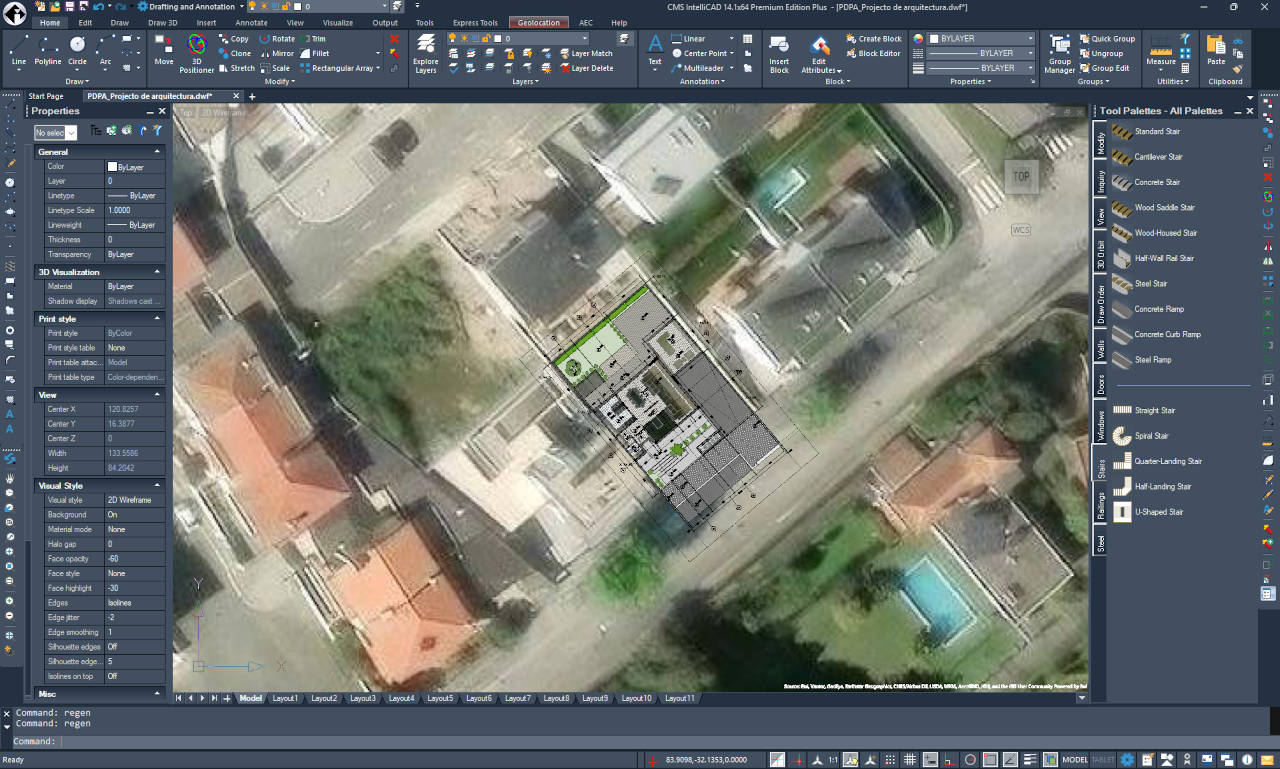
What's new in CMS IntelliCAD 14.1

What's new in CMS IntelliCAD 14.1


CMS IntelliCAD 14.1 User Interface

CMS IntelliCAD 14.1 introduces significant performance gains, expanded geospatial capabilities, and refined BIM workflows to streamline professional drafting.


1. Mapping & Geospatial Integration

  • Geospatial PDFs: Export drawings to PDF with live coordinate and measurement metadata, allowing reviewers to see real-time location data.
  • Azure Maps: In addition to Bing, users can now utilize Microsoft Azure Maps with the new GEOMICROSOFTSERVICE command.

2. Performance & Security Enhancements

  • Speed Boosts: Enjoy up to 63% faster line creation when snapping and 2x faster Copy commands (with VBA enabled). Performance for Undo and GEO map rendering has also been optimized.
  • Secure Signing: Digital signatures now leverage Cryptography Next Generation (CNG) technology, supporting self-signed certificates for easier security workflows.
  • Advanced Undo: The new MREDO (Multiple Redo) command allows users to roll back multiple changes and system variable updates simultaneously.

3. Drafting & Block Management

  • Block Testing: The BTESTBLOCK command allows users to test advanced blocks in a temporary window without altering the original definition.
  • Enhanced Tool Palettes: Now supports images, leaders, and external references with high-visibility previews.
  • Table & Layer Automation: Tables now support auto-filling with blocks and improved keyboard navigation. Layer filters can be exported to .lft files or copied directly to Excel for auditing.

4. BIM Workflows

  • BIM Openings: New anchor options provide precise control over how doors and windows orient and scale relative to walls.

5. UI & API Improvements

  • Dynamic UI: Icons now automatically adapt to Dark, Gray, or Light themes. Selection cycling is now accessible directly from the status bar.
  • LISP & .NET: Support for compiled FAS and VLX LISP formats for protected distribution, alongside new debugging tools in Visual Studio Code and expanded IcARX functions.

Note: This update also includes extensive "under the hood" fixes for external references, snapping, data extraction, and polyline editing to ensure maximum stability.

Free trial available at https://intellicadms.com

CMS IntelliCAD 14.1 licenses are available as Perpetual or Lease Standalone seats, USB dongle seats, Network floating seats or Renewable Subscriptions.
What's new in CMS IntelliCAD 13.0

What's new in CMS IntelliCAD 13.0


CMS IntelliCAD 13.0 User Interface

The New CMS IntelliCAD® 13.0 CAD Software another step forward on new features and improvements. Free trial or demo available at the download section of this website.

What's new:

CMS IntelliCAD 13.0 is a major release that includes performance improvements and new features, including a new Options dialog which is highly compatible with other CAD applications, calculators for evaluating expressions and converting units of measurement, lookup tables and the ability to reset advanced blocks. When creating reports, extract data from external references, advanced blocks, attributes, and AEC entities; extract from .dgn, .ifc, .rvt, and .rfa files when supported; and filter data to meet conditions.

LISP is completely refactored to improve performance and increase compatibility with other CAD applications. Other new features include Flatshot, Solid Profile, Make Shape, Compile to SHX, and Make Linetype, and more.

For CMS IntelliCAD 13.0 PE PLUS licenses that include Spatial® Technology ACIS® modeler, use the following commands to work with surfaces: Network, Offset, Fillet, Extend, and Trim.

All CMS IntelliCAD support working with BIM files: use the IFC Validate, RVT to IFC conversion, and Corner Window commands; dimension AEC entities; manage layers for .ifc underlays; define styles for new elements such as roof slabs, dimensions, structural members, and more; and attach railings to stair segments.

For technical users, CMS IntelliCAD 13.0 uses ODA SDKs version 2024.12. IntelliCAD IcARX continues to be a pre-release version and is highly compatible with AutoCAD® Object ARX, allowing developers to build applications with a single code base that runs on both platforms.

CMS IntelliCAD 12.x licenses are available as Perpetual or Lease  Standalone seats, USB dongle seats, Network floating seats or Renewable Subscriptions.

What's new in CMS IntelliCAD 15.0

What's new in CMS IntelliCAD 15.0


CMS IntelliCAD 15.0 User Interface

CMS IntelliCAD 15 Released: AI photo-realistic rendering, Drawing Compare Preview, Ergonomic Navigation Enhancements and Fully Modernized LISP Engine

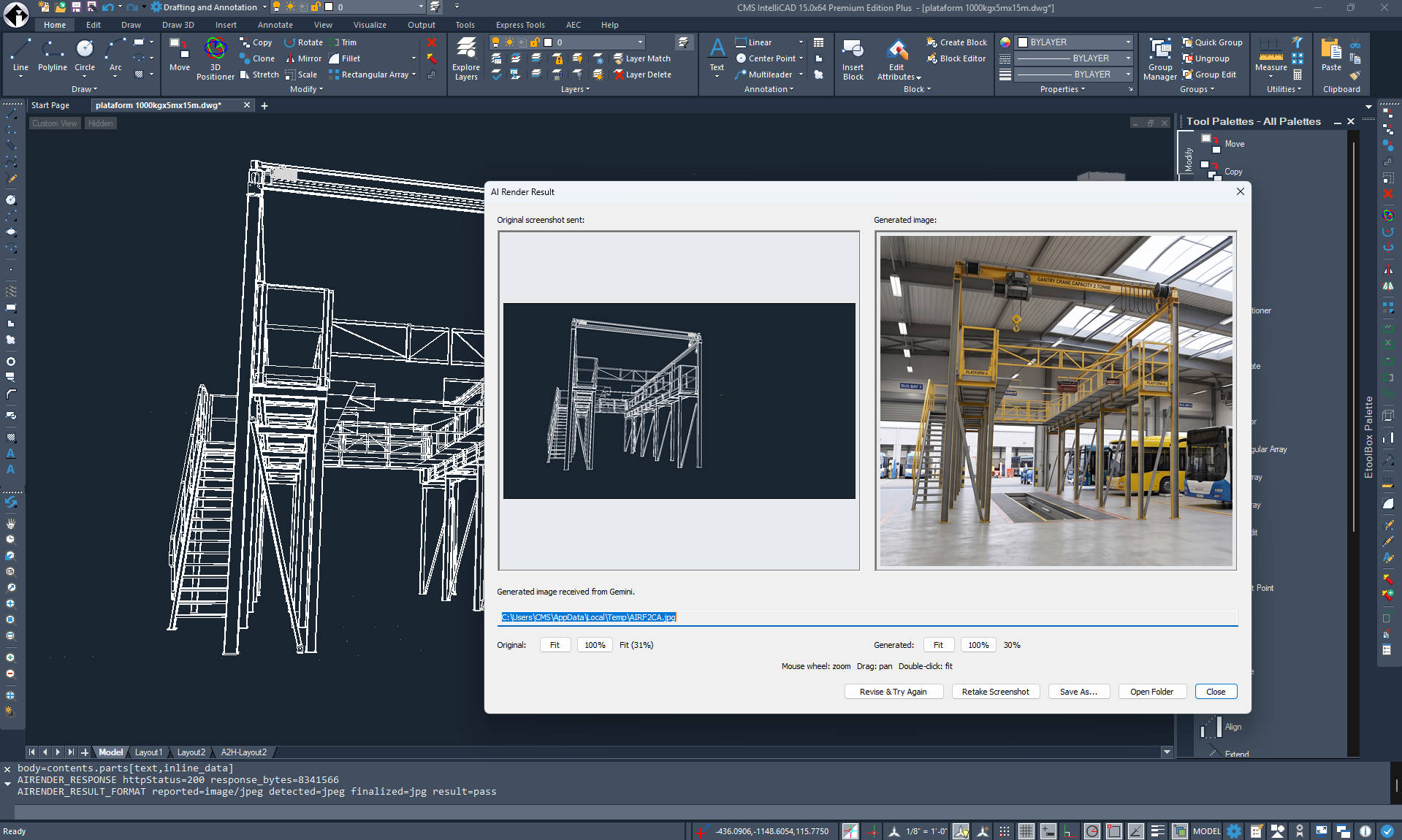
CMS announces the release of CMS IntelliCAD 15, a landmark update that introduces highly anticipated core engine updates alongside two groundbreaking features: the "Lookout" PAN tool and AI Photorealistic Rendering.

Revolutionary patent pending "Lookout" PAN Method

Navigating large and complex CAD environments is now significantly faster and more ergonomic.

  • Seamless Workspace Navigation: Traditional panning requires an unproductive "dead-stroke" when moving the mouse back to a neutral starting position. The "Lookout" method wholly resolves this inefficiency by capturing the physical mouse movement in-between standard active PAN inputs and applying an inverse translation to the digital workspace
  • Ergonomic Optimization: This effectively doubles the navigational efficiency of the user, allowing them to traverse large CAD drawings in roughly half the time and with half the physical effort required by state-of-the-art systems. It drastically reduces the number of physical clicks and the overall distance the hand must travel, which significantly diminishes ergonomic strain and lowers the risk of repetitive strain injuries.
  • Intentionality and Integration: The inverse panning is explicitly invoked via a modifier key (CTRL) combined with standard, non-button-depressed mouse movement. The system is specifically programmed to bypass the "Lookout" feature if the user holds the CTRL key while simultaneously depressing the 3rd mouse button, guaranteeing that pre-existing CAD shortcuts are preserved and remain entirely unaffected.

Instant AI Photorealistic Rendering

CMS IntelliCAD 15 transforms basic CAD designs into breathtaking, presentation-ready visual assets directly from simple text prompts.

  • Powered by Google's Gemini AI: Users can skip setting up lights and material nodes by simply describing their vision (e.g., "modern concrete villa at sunset"). This instantly produces high-resolution presentation images in up to 4k.
  • Automated Visual Prepping: The smart Auto-Prep feature automatically hides drawing grids, coordinate axes, and menus while capturing clean geometry. This ensures the AI focuses purely on design quality.
  • Interactive Conversational Refinement: Users can easily request tweaks like "make the sky cloudier" or "change to wood cladding" in an active chat session. This allows users to perfect their output without starting over.
  • Full Privacy & Secure API Control: Users can plug in their own personal or corporate Gemini API key for complete control over usage limits and data privacy preferences.
  • Connectivity Note: Please note that CMS IntelliCAD 15 does not have an AI MCP connector.

IntelliCAD 15.0 Key Features & Enhancements

  • Drawing Compare (Preview): A new tool to visually compare two drawings. Differences are color-coded (unique objects in red/green, shared in gray), related changes are grouped in revision clouds, and a dedicated toolbar allows you to easily step through and sync differences.
  • Modernized LISP & Developer APIs: Developers can now compile and protect LISP source code into AutoCAD-compatible .FAS and .VLX formats using new tools and wizards. The ActiveX/COM and .NET APIs also received upgrades for deeper access to block properties, table data, and custom palettes.
  • BIM Improvements: Enhanced workflows now support Revit Type Catalogs, curved wall designs, and improved IFC import for complex wall geometry.
  • User Interface Upgrades: Standard versions now include the Ribbon, Quick Access Toolbar, and Start Page by default. The IntelliCAD Explorer features resizable/freezable columns, and the application loader has been redesigned for intuitive navigation.
  • Drafting & Tool Enhancements: Everyday commands are smarter, featuring live previews for FILLET and CHAMFER, better entity snap tracking, new Revision Cloud options, and Table AutoFill functionality.
  • Printing & Publishing: Users get more flexibility with new print resolutions, additional shade plot styles, and the ability to publish DXF files directly to a list.
  • Massive Performance Gains: The new version delivers significant speed improvements, including up to 48x faster VBA iteration through Model Space, 12x faster Undo with VBA, 3x faster compiled LISP execution, and 3x faster loading for large slide images.
  • Core Updates: Additional improvements include slide library support for the VSLIDE command, an upgraded ACIS modeling kernel, and updated core libraries.

Free trial available at https://intellicadms.com/download

CMS IntelliCAD 15.0 licenses are available as Perpetual Standalone seats, USB dongle seats, Network floating seats or Renewable Subscriptions.

What's new in CMS IntelliCAD 13.1

What's new in CMS IntelliCAD 13.1


CMS IntelliCAD 13.1 User Interface

The New CMS IntelliCAD® 13.1 CAD Software new features, performance improvements and additional refinements. Free trial or demo available at the download section of this website.

What's new:

CMS IntelliCAD 13.1 is a major release that includes performance improvements and new features, with a focus on enhanced reporting capabilities using the Extract Data command. Extracting data is completely refactored for improved performance and additional reporting on drawing properties (such as file size, path, etc.), drawing system variables, and the number of entities in drawings. Users can customize reports before they’re created with more options and now easily update linked report tables in drawings.

Other new features include customizing user interface elements for running and one-time entity snaps, printing to PNG files with transparent backgrounds, using an additional interactive dialog to precisely move and rotate entities with the 3D Positioner command, selecting from new options for the Trim and Extend commands, cloning additional entity types with the Clone command, and restoring hidden program messages individually.

Additionally, LISP and IcARX APIs include enhanced compatibility and improved performance

All CMS IntelliCAD versions support BIM files, and with this new release users create architectural spaces using the Spaces command, and infill AEC entities when using the Section Plane command.

For technical users, CMS IntelliCAD 13.1 uses ODA SDKs version 2024.12. CMS IntelliCAD IcARX continues to be a pre-release version for members and is highly compatible with AutoCAD® ObjectARX, allowing developers to build applications with a single code base that runs on both platforms..

CMS IntelliCAD 13.1 licenses are available as Perpetual or Lease  Standalone seats, USB dongle seats, Network floating seats or Renewable Subscriptions.